The newest WCAG version isn’t always the one a regulation names. That can leave teams unsure whether to follow wcag 2.1, move to WCAG 2.2, or test against both. The distinction matters: WCAG 2.1 expanded on 2.0 with criteria addressing mobile use, low vision, and cognitive or learning disabilities, while WCAG 2.2 adds further requirements.
If you’re comparing versions, look beyond the version number. WCAG 2.1 remains an active W3C Recommendation, while WCAG 2.2 is the current version and is backward-compatible with 2.1 and 2.0. Work toward 2.2 therefore covers earlier criteria while adding checks for issues such as focus visibility, target size, and accessible authentication.
This guide explains what WCAG 2.1 covers, where WCAG 2.2 differs, and how to turn success criteria into practical website checks. You’ll also see how automated scanning can help identify detectable barriers and where human review is still needed. A scan is a useful first step, not proof of complete conformance. Use the comparison to choose an evaluation path and decide what to check next.
Key Takeaways
- Understand why wcag 2.1 was introduced and how its additional criteria address accessibility needs not covered by WCAG 2.0.
- Connect criteria to user needs, such as mobile access and low vision, instead of treating them as a checklist without context.
- Compare WCAG versions by what changed and what those changes mean for your website’s target conformance level.
- Build a repeatable review process: define scope, identify key user journeys, test, prioritize barriers, and retest.
- Use an automated scan to flag detectable issues, then treat the results as one part of a broader accessibility evaluation.
What Is WCAG 2.1, and Why Was It Introduced?
What does version 2.1 change for your website? It adds accessibility requirements to the foundation established by WCAG 2.0. Those additions address barriers that can affect people using mobile devices, people with low vision, and people with cognitive or learning disabilities. They supplement the earlier criteria rather than replacing them.
WCAG 2.1 is a set of W3C guidelines for making web content more accessible, extending WCAG 2.0 with additional success criteria. Each criterion describes a testable requirement. Together, the guidelines help teams identify and reduce barriers, but they can’t capture every part of a person’s experience. Accessibility also depends on how people complete real tasks and interact with a site.
Who publishes WCAG, and what does the version number mean?
The World Wide Web Consortium (W3C) publishes the Web Content Accessibility Guidelines through its Web Accessibility Initiative (WAI). The version number identifies a release of the guidelines. It’s separate from a conformance level: Level A, AA, or AAA indicates how demanding a set of requirements is, not which WCAG version you’re using. For background on the broader inclusive practice of ensuring no barriers, see the overview of web accessibility.
What accessibility needs did WCAG 2.1 address?
WCAG 2.1 added 17 success criteria across Levels A, AA, and AAA. They address needs such as using a website on a mobile device, enlarging content, and interacting with content when vision, cognition, or learning differences affect how someone accesses information. The aim is to reduce specific barriers, not to suggest that one criterion can solve every challenge a user may face.
For example, mobile access can be affected by content that requires a particular screen orientation. Low-vision access can depend on whether text remains usable when resized. Other criteria address input methods and interaction. Each requirement has a defined scope, so passing one check doesn’t prove that an entire user journey is accessible.
In practice, treat the added criteria as part of the full set, not as a separate mobile-only checklist. Review WCAG 2.0 criteria alongside the additions in wcag 2.1, then test key tasks with different devices and access needs in mind. A criteria-based review gives teams a structured starting point, while user-focused testing can reveal friction that a technical requirement alone may not describe.
Which WCAG 2.1 Criteria Matter Most for Mobile and Low-Vision Access?
Which added requirements are most likely to expose friction on a real site? WCAG 2.1 introduced 17 success criteria across Levels A, AA, and AAA. They cover mobile orientation and reflow, touch and pointer interaction, text spacing, non-text contrast, and content shown on hover or focus. The Web Content Accessibility Guidelines (WCAG) 2.1 sets out each criterion and its exceptions. Use the user need behind each requirement to guide your testing.
How WCAG 2.1 addresses mobile and touch interaction
A page can resize correctly and still be difficult to use. The criteria address different points where interaction can fail:
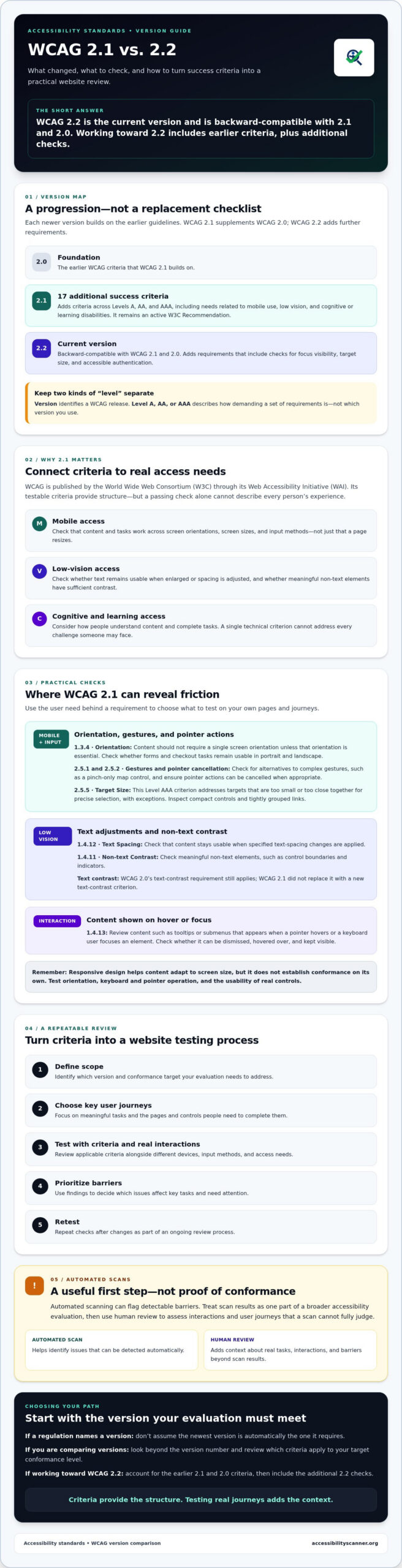
- Orientation: Success Criterion 1.3.4 requires content not to restrict display and operation to a single screen orientation unless a specific orientation is essential. Check whether a form or checkout remains usable in both portrait and landscape.
- Gestures and input: Criteria 2.5.1 and 2.5.2 address complex pointer gestures and pointer cancellation. For example, a map controlled only by a pinch gesture should have a simpler alternative. An action triggered on pointer-down can also be difficult to cancel if the user moves away before releasing.
- Tap targets: Criterion 2.5.5, Target Size, is a Level AAA criterion. It addresses targets that are too small or close together for precise selection, though it includes exceptions. Inspect compact icon controls and tightly grouped links.
Responsive design helps content adapt to screen size, but it doesn’t establish conformance on its own. Teams still need to check orientation, keyboard and pointer operation, and whether controls work for people who can’t perform precise gestures.
How WCAG 2.1 supports low-vision and cognitive access
For users who enlarge text or adjust spacing, Success Criterion 1.4.12 requires content to remain usable when specified text-spacing changes are applied. Criterion 1.4.11 covers contrast for non-text elements, such as meaningful control boundaries and indicators. WCAG 2.0’s text-contrast requirement still applies; 2.1 didn’t replace it with a new text-contrast criterion.
Content that appears on hover or keyboard focus has its own requirement in Criterion 1.4.13. Check whether a tooltip or submenu can be dismissed, hovered over, and kept visible when needed. These checks can help people who use magnification or need more time to follow changes on screen.
These criteria target specific barriers, not every individual need or usability problem. Start with representative pages and tasks, then combine criteria-based checks with an evaluation of how people actually use the interface. An automated accessibility checker can help flag detectable issues, but its results need interpretation and don’t establish complete WCAG conformance.
WCAG 2.1 vs. WCAG 2.0 and 2.2: What Actually Changed?
Does each new version replace the previous one? No. WCAG 2.1 builds on WCAG 2.0 by adding criteria while retaining the earlier requirements. WCAG 2.2 extends that framework with more criteria. The practical difference is the added coverage, not a wholesale rewrite of the standards.
| Version | Published | What changed | Practical relevance |
|---|---|---|---|
| WCAG 2.0 | December 11, 2008 | Established the original WCAG 2.x criteria. | Remains relevant as the foundation of later versions. |
| WCAG 2.1 | June 5, 2018 | Added 17 success criteria across Levels A, AA, and AAA. | Expanded coverage for mobile use, low vision, and cognitive or learning needs. |
| WCAG 2.2 | October 5, 2023 | Added nine success criteria and removed one criterion, 4.1.1 Parsing. | Introduces further checks, including focus visibility, target size, and accessible authentication. |
What changed from WCAG 2.0 to WCAG 2.1?
The W3C’s Web Content Accessibility Guidelines (WCAG) 2.1 added 17 criteria to address barriers that weren’t explicitly covered by WCAG 2.0. These include requirements related to screen orientation, text spacing, pointer gestures, and content displayed on hover or focus. The additions matter because a site that works with a mouse on a desktop may still create friction for someone using a touchscreen, magnification, or a different input method.
WCAG 2.0 still matters. WCAG 2.1 includes its criteria and adds to them. When comparing requirements, check which version and conformance level apply to your work rather than treating each release as a clean break.
Does WCAG 2.2 replace WCAG 2.1?
WCAG 2.2 extends the 2.1 framework. Its nine new criteria add checks for issues such as obscured keyboard focus, dragging interactions, consistent help, and authentication. The W3C removed 4.1.1 Parsing from WCAG 2.2 because it is obsolete. That removal applies to the 2.2 version; 4.1.1 remains in the earlier versions.
WCAG 2.2 is backward-compatible: content conforming to 2.2 also conforms to 2.1 and 2.0. When deciding what to target, compare the applicable requirements and user needs, then select a version and level deliberately. A version comparison clarifies the criteria, but it doesn’t replace checking which standard a particular obligation names.
How Should Your Team Apply WCAG 2.1 to a Website?
Don’t start by checking random pages. Set a clear scope, then test the paths people rely on to find information, complete forms, or make a purchase. A repeatable process keeps the review focused and makes it easier to track whether changes resolve observed barriers.
- Set the target. Confirm the WCAG version and conformance level relevant to your project. List representative templates and key user journeys, such as account sign-in or checkout.
- Map criteria to the site. Identify which success criteria apply to each template, component, and interaction. For example, a navigation menu needs checks for keyboard access and visible focus, not just its appearance on screen.
- Test in context. Check pages with a keyboard, zoomed content, touch input, and a screen reader. Include automated testing to surface machine-detectable issues, but don’t treat it as the entire evaluation.
- Prioritize barriers. Record what happened, how to reproduce it, which users may be affected, and whether it blocks a key task. Fix the most obstructive barriers first instead of ranking work by scan score alone.
- Retest. Repeat the same steps after changes. Confirm that the original issue is resolved and that the change hasn’t created a new barrier elsewhere.
How can teams turn success criteria into test cases?
Translate each relevant criterion into a concrete question about a page or interaction. For example: Can a keyboard user reach and operate every checkout control? Does the interface remain usable when content is zoomed? Record the page, steps, result, and evidence for each issue. This turns broad wcag 2.1 requirements into findings your team can verify and track.
For a separate resource on choosing a scanning tool, consult a WCAG compliance scanner guide. Use it to understand what automated tools can flag, then match those findings to your own criteria and testing scope. If you’re comparing options, this guide on how to evaluate an automated WCAG audit tool explains which capabilities to compare.
What can an automated WCAG scan establish?
An automated scan can identify some issues that software can detect from page content and code. It can’t reliably judge every context-dependent barrier. Determining whether a screen-reader announcement makes sense, a keyboard sequence is practical, or a component works in a real task may require human evaluation.
Use a free automated accessibility scan as an initial issue-finding step. Review and interpret its results alongside keyboard, zoom, touch, and screen-reader checks. A scan can help direct attention, but it isn’t a conformance verdict and doesn’t confirm that every relevant criterion has been met.
What Should You Do After Learning the WCAG 2.1 Requirements?
Turn the version comparison into a review plan. First, check which accessibility obligations apply to your organization and what standards procurement documents or project requirements name. Then choose a WCAG version and conformance level that fit those requirements and your project timeline. This is a standards-selection step, not a substitute for legal advice.
Should a website target WCAG 2.1 or WCAG 2.2?
Start with the standard that applies to your situation. Some requirements may specifically name WCAG 2.1, while a contract or procurement process may set a different target. WCAG 2.2 is the current W3C recommendation and builds on earlier versions with additional criteria. Its newer checks can help teams address further accessibility needs, but no single version should be treated as universally sufficient for every organization or obligation.
Write down the target version and level before testing. Record why you selected them, including relevant requirements, procurement expectations, and delivery constraints. If a project starts with WCAG 2.1, teams can still consider 2.2’s additional criteria as part of a broader accessibility plan.
How can an accessibility scan support the next step?
Don’t stop at one homepage. Select representative templates, such as a product page, form, and account area, then walk through critical user journeys. Track findings in separate categories so an automated flag isn’t mistaken for a confirmed barrier or a completed fix:
- Detected issues: Items reported by an automated tool that need review.
- Confirmed barriers: Findings reproduced through testing and documented with the affected page, steps, and user impact.
- Remediation work: Changes planned or completed to address a confirmed barrier.
- Retesting records: Evidence that the original steps were repeated and the result checked.
An automated scan can quickly surface some detectable issues, giving your team a practical place to begin. It can’t establish complete WCAG conformance or replace evaluation of keyboard access, screen-reader output, and context-dependent interactions. Interpret the scan results, then test relevant tasks and document what you find.
Start with one representative page: run AccessibilityScanner.org’s free automated accessibility scanner, review the reported issues, and use them to plan broader testing. Treat the results as an initial signal, not a conformance verdict.
Turn WCAG Guidance Into Your Next Accessibility Check
WCAG 2.1 added criteria to address needs such as mobile access and low vision, while WCAG 2.2 extends that foundation with further requirements. Choose a version and conformance level that fit applicable obligations and project needs, then test representative templates and critical user journeys rather than relying on a single page.
Keep automated findings in perspective. A scan can quickly surface detectable issues, but its results need interpretation and don’t establish complete WCAG conformance. Combine them with checks of how people navigate and use your website.
Start with a practical first step: run a free automated accessibility scan to identify detectable issues and help plan further evaluation. The scanner provides automated checking only; it doesn’t include a manual audit, remediation, or legal advice. Use the results to focus your next checks, track barriers, and make steady progress. A clear process turns wcag 2.1 requirements into manageable work, one finding at a time.
Frequently Asked Questions
What is WCAG 2.1?
WCAG 2.1 is a version of the Web Content Accessibility Guidelines, published by the World Wide Web Consortium (W3C). It provides testable requirements for making web content more accessible to people with disabilities. WCAG 2.1 builds on WCAG 2.0, adding criteria that address needs including mobile access, low vision, and cognitive or learning disabilities. It uses the same Level A, AA, and AAA conformance structure as other WCAG 2.x versions.
What is the difference between WCAG 2.0 and WCAG 2.1?
WCAG 2.1 adds 17 success criteria to WCAG 2.0, expanding coverage without replacing the earlier criteria. The additions address accessibility needs such as mobile orientation, touch and pointer interactions, text spacing, and content shown on hover or focus. WCAG 2.0 remains the foundation of the later version. When evaluating a website, account for the original criteria as well as the additions at your chosen level.
Is WCAG 2.1 still relevant in 2026?
Yes. WCAG 2.1 remains an active W3C Recommendation in 2026, and some requirements reference it. WCAG 2.2 is the current recommended version, so teams should check which version applies to their obligations or project requirements. WCAG 2.2 is backward-compatible with WCAG 2.1. Choosing a target requires more than picking the newest number: confirm the applicable standard and conformance level, then test the website against that scope.
Does WCAG 2.2 include WCAG 2.1?
Yes. WCAG 2.2 extends the WCAG 2.1 framework with additional success criteria, and content that conforms to WCAG 2.2 also conforms to WCAG 2.1 and WCAG 2.0. WCAG 2.2 removed success criterion 4.1.1, Parsing, because it was considered obsolete. This change doesn’t erase the earlier versions. Check the version and conformance level named in any relevant requirement or project specification.
How many new success criteria did WCAG 2.1 add?
WCAG 2.1 added 17 success criteria across conformance Levels A, AA, and AAA. The criteria extend WCAG 2.0 to address barriers related to mobile use, low vision, and cognitive or learning needs. Examples include requirements concerning orientation, text spacing, and pointer gestures. The additions supplement the earlier criteria rather than replacing them, so teams evaluating against WCAG 2.1 need to consider the full set of requirements at their chosen level.
Can an automated scanner check WCAG 2.1 compliance?
An automated scanner can identify some accessibility issues that software can detect, but it can’t confirm complete WCAG 2.1 conformance. Keyboard operation, screen-reader output, and context-dependent interactions often require human evaluation. AccessibilityScanner.org offers free automated scanning to help website owners and developers surface detectable barriers. Treat scan findings as a starting point: review the results, test relevant user journeys, and check any criteria that automation can’t assess reliably.
Does WCAG 2.1 compliance guarantee ADA compliance?
No. WCAG 2.1 conformance doesn’t guarantee ADA compliance. WCAG is a technical standard, not a law, and whether it applies to a particular situation depends on the relevant legal requirements and context. A website can also have barriers that an automated check or limited review doesn’t detect. Use WCAG criteria to guide accessibility evaluation, but don’t treat a conformance claim or scanner result as a legal determination or a guarantee against legal action.